
 |
 |
 |
 |
 |
 |



| Internet Explorer |
You may be asked to restart your computer, otherwise the livecam images should appear in the window within a few seconds. You will only have to install the Axis Media Control software once. Afterwards you will no longer receive the pop-up warnings. If for some reason the software doesn't install through the browser, you can download the latest version here. Note: It's come to my attention that images still won't display in Internet Explorer 11 on Windows 10. To fix, you need to add the website to the Compatibility View. To do so, in Internet Explorer, go to Tools (Alt+X), Compatibility View settings, and add the website as below and click Close.
|

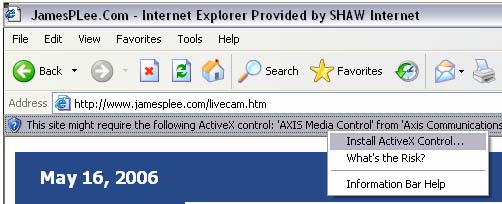 If you are running Internet Explorer you will see the 'This site might require the following...' appear near the top of the browser window. Click on it and select 'Install ActiveX Control...' to install the Axis Media Control software.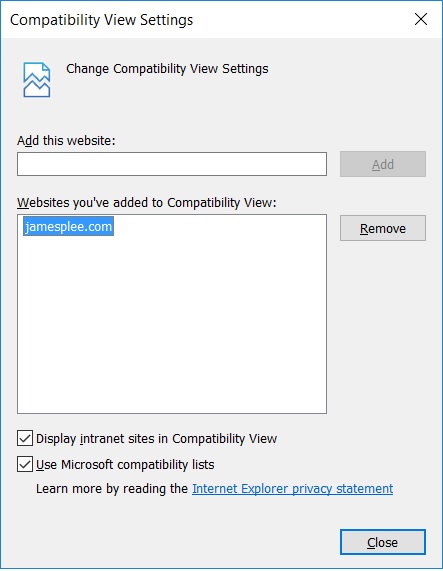
| Firefox |
By default, everything should work without requiring any user intervention. If however, images are not appearing, from the Firefox menu select Tools, Options, and click on the Content icon. Make sure that 'Load Images', 'Enable Java', and 'Enable JavaScript' are checked. |

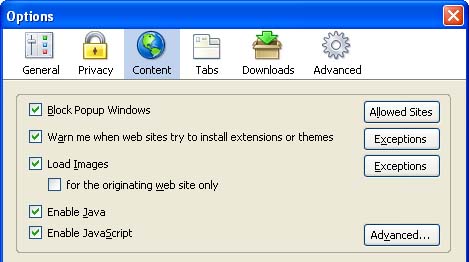 If you are running Firefox, Livecam images are streamed using Java. Therefore you will not have to install the Axis Media Control software.
| Safari |
And as with Firefox, if images aren't appearing, go into the Preferences menu, and click on the Security icon. Make sure both 'Enable Java' and 'Enable JavaScript' are checked. |

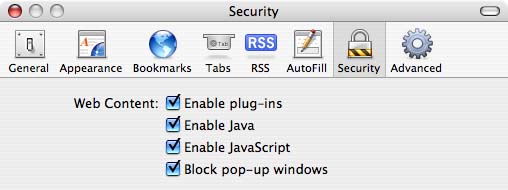 Mac users running Safari will also have Livecam images streamed using Java.
| Chrome |
By default, everything should work without requiring any changes, however you will have to install the Java plug-in if it is not already installed. That plug-in for Windows users can be found here. Mac users receive Java updates through the built-in Software Update mechanism and don't require a separate download. |
 Google Chrome also uses Java to stream images.