
 |
 |
 |
 |
 |
 |






| Motherboard Meltdown |
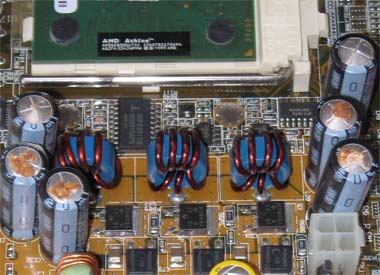
 Kim recently brought her desktop to me to have a look at. For the previous few weeks it would take several power cycles before it would boot properly until eventually it wouldn't boot at all. Kim recently brought her desktop to me to have a look at. For the previous few weeks it would take several power cycles before it would boot properly until eventually it wouldn't boot at all.My first thought was that the power supply might have gone bad. Before buying a new supply however I decided to replace the motherboard battery as they are quite cheap. That didn't work so I bought and installed a new power supply. That also didn't work. Great. I had already yanked out all the cards, power connectors and extra memory so that it was loaded as lightly as possible. Still I was presented with a blank screen on the monitor when I powered on - almost mocking me. Finally I got right in there and inspected the motherboard (which is what I should have done to begin with) and found out what the problem was. Kim's motherboard was suffering from leaky capacitors. I could see that the ones which formed the voltage regulator to the CPU's were bulging and in some cases leaking. A new motherboard would have cost her a significant amount as she would have had to get a new processor and new memory as well. So the thought of maybe removing the faulty caps and replacing them myself crossed my mind. However I would have had to buy a soldering iron, flux and so on. Plus there'd be the very real chance I'd end up damaging the motherboard even more in the process. Salvation presented itself in the form of a website which specializes in these kind of repairs. So today I packaged up her motherboard and sent it off for servicing. I have my fingers crossed that this will fix her problems once and for all. Considering the huge scope of this problem such a business might be very lucrative, however I'd guess that most people wouldn't even realize what the problem was and thus wouldn't attempt to fix it.
|
| Playing God |
  Scientists and engineers recently fired up the Large Hadron Collider (LHC) for a test run. The Collider is the world's largest particle accelerator, spanning two countries in Europe and costing an estimated 12 Billion CDN to build. Scientists and engineers recently fired up the Large Hadron Collider (LHC) for a test run. The Collider is the world's largest particle accelerator, spanning two countries in Europe and costing an estimated 12 Billion CDN to build.Its purpose is to accelerate particles of matter towards each other until they smash together and then record the results using obviously very sophisticated detection equipment. Scientists are trying to find a theoretical particle which would solve a long outstanding mystery of particle physics and to recreate conditions which occurred during the big bang. While some might question the wisdom of spending that kind of money just to solve a highly theoretical question instead of on something more tangible, the main controversy surrounding this project is in regards to one possible side effect. Apparently there's a chance (although small) that this process could spawn a black hole which would suck earth into itself and destroy the planet and all of mankind along with it. A group have scientists have even gone as far as taking legal action to try and have the project scrapped. Another larger (and better funded) group of scientists have assured everyone that scenario won't happen. So essentially you have one group of eggheads saying it's perfectly safe and another group of eggheads saying it could be the end of the world. Of course they're going ahead anyway. They've crunched the numbers and apparently the benefits outweigh the risk of disaster. I'm reminded of the Manhattan Project when the US raced to build the atom bomb. In a similar manner, one group of scientists thought there was a chance that exploding such a weapon would cause a cascading effect in the Earth's atmosphere and end up destroying the planet. Thankfully they were wrong. But you have to think that at some point our continuing need to play God will be our downfall. Update: A helium leak has damaged a critical portion of the assembly and the whole project is on hold for at least two months while repairs are carried out. So it looks like the end of the world will have to wait until the New Year. |
| Mac Security Hardening |
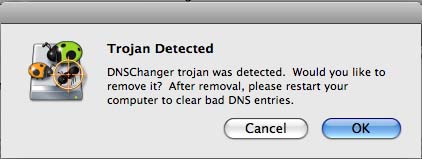
 Partially through my praise of Apple and the operating system OS X a number of friends and family have made the switch away from Windows. Partially through my praise of Apple and the operating system OS X a number of friends and family have made the switch away from Windows.While I'm happy that more and more people have seen the light there also comes a certain feeling of responsibility because these people are spending hard earned money based on my recommendations. The latest person to heed my advice was Chris' mom. She recently bought an iMac system. Chris and I visited her recently and while we were there we showed her a number of it's features and handy tricks and tips. Late one night I logged on to check my email and I noticed something odd. Every 2nd or 3rd webpage I visited would get redirected to some spam based website. This is what's known as a browser 'hijack'. After scratching my head for awhile I realized what was going on. The Mac was infected with a virus. Just great. After going on about how much better Mac's were because they never got viruses, here right in front of me, almost mocking me, was one. After doing some digging I found out that the culprit was in fact a form of a Trojan that overwrites the DNS settings with addresses that end up redirecting web page requests to bogus sites. There were lots of step by step instructions out there on how to get rid of it - except they all assumed you were running Windows! From what I can tell, this could very well be the first instance of a Mac being infected with something of this nature. On Macs, it is known by the classification 'OSX.RSPlug.A'. A few hours later I stumbled across a Mac specific website which had a program to fix the problem. I ran the program and sure enough it found the infection and removed it. I rebooted and everything was back to normal.
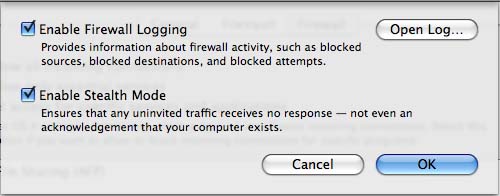
After the shock of what I experienced wore off I realized that while Macs are inherently more secure, there are still some steps that should be taken to reduce the chance of of them getting compromised. Therefore I would highly recommend anyone running OS X to enable their firewall which by default is not turned on. In the latest version of OS X (10.5 or Leopard) you can do this by performing the following steps:
This will turn the firewall on, but you should also perform one additional step which will shield your system from being discovered via any probe or scan coming in from the Internet.
Enabling the firewall coupled with the security of running a Unix based Operating System will go along way to keeping your Mac safe. That said, it is essential to always follow safe computing practices. Never install any programs downloaded off the Internet unless you trust the website they came from, never open any email from people you don't know, back up important data, and be sure to keep your system and applications updated as fixes are made available. Happy Safe Computing! |
| Back To The Future |
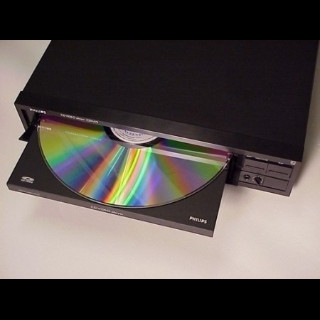
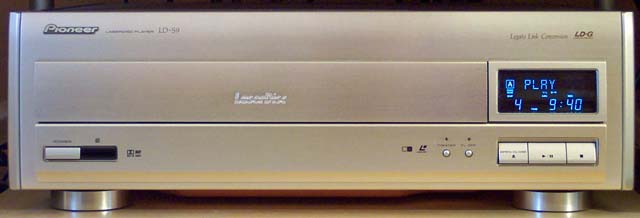
 Work I recently did on my Dragon's Lair (DL) game and it's Laserdisc player put the bug in me to find out exactly what's out there in terms of this technology. So I hopped on eBay, punched in 'Laserdisc' and had my mind blown at the sheer quantity of material being offered up for sale. Work I recently did on my Dragon's Lair (DL) game and it's Laserdisc player put the bug in me to find out exactly what's out there in terms of this technology. So I hopped on eBay, punched in 'Laserdisc' and had my mind blown at the sheer quantity of material being offered up for sale.Before obtaining my DL, my only other exposure to Laserdisc technology was when I was a kid. I remember when my parents rented a player and movie which I believe was Quest for Fire, which would make it about 1981. I recall thinking the setup was neat but also a bit odd, especially when we had to flip over the disc when it needed to switch to the other side. So between my love for all things from that era and listings for multiple discs for only 99 cents I went a bit bid-crazy. I now have easily over 250 discs. Of course I also needed a player to play them on and I managed to get a mint condition player from high end company Marantz. However with all things eBay, you usually end up with lots of crap along with the gems. I'd say about half of my collection are cosmetically in excellent shape and the other half are a bit banged up. Why Laserdisc? Partly because of the retro factor, partly because technically it has some advantages even to this day over DVD's, partly because some movies are only available on Laserdisc, and finally because much like LP's the packaging is much more satisfying than the crappy little insert you get with DVD's. Image wise the picture quality is much better than VHS and is comparable to DVD. But most aficionados will point out that audio quality is where LD really shines. Because of its physical size movies were able to have audio tracks which were uncompressed. In fact, it's only with the advent of Blu-Ray where sound quality has once again matched what was available 30 years ago. While starting out with 2 Channel Stereo, newer releases had Digital 5.1 surround and were THX certified. And while most movies are labeled as being 'Widescreen' they are in reality letterboxed because widescreen TV's didn't exist back then. However once widescreen TV's started to appear about a dozen titles were released (Squeeze LD's) which were truly widescreen, having a 1.85 aspect ratio. These discs obviously are very rare and highly valued. Although the last movie released on the LD format was in 2001 (The Cell), there's still a large and active community in Japan. Some of the most advanced players which were never sold in North America and only stopped being produced recently will still sell for thousands of dollars. What was once a high-end niche market for movie lovers is enjoying something of a renaissance as more and more people catch on to how cool this ground breaking technology was and in many ways still is. Now I'm off to watch the original Star Wars trilogy, in it's best looking format, before Lucas butchered it with his tweaking. Update I managed to get the second most advanced laser disc player ever made off of eBay for a hefty amount. The Pioneer LD-S9 was only sold in Japan and was sold up until 2002 when Pioneer stopped making Laserdisc players. This player represents the pinnacle of this technology.
|
| Bigger, Better, Faster |
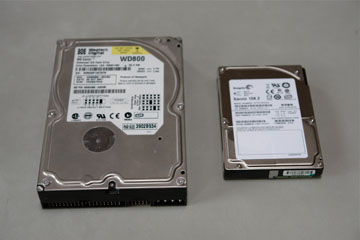
 Having had a few days off, I finally got around to upgrading my gaming computer. Having had a few days off, I finally got around to upgrading my gaming computer.Way back when I built my new system I had always intended on installing a Raid adapter card, switching from the usual SATA based hard drives to ones that were SAS based, and running a liquid cooled video card. However at the time these items were unavailable so I went ahead without them. I'm happy to say my system is now as I originally intended :) Not long after I built it I was able to find a Sapphire Toxic 1950 XTX card which is the liquid cooled version and install it. It's a bit disconcerting listening to your system 'gurgle' as it runs, but so far it's been working just fine. And just this past week I installed the Raid adapter card and the new hard drives. The adapter card comes with 128MB of cache memory and can operate in a variety of Raid modes. I ended up choosing Raid 0 (also known as striping) as it gives me the fastest possible performance by striping data across two drives in parallel. In addition to running in a Raid config on a dedicated adapter card I was able to get two Savvio 2.5" SAS drives. Switching to the smaller size drive (see the picture for the size difference) has the benefits of being to able run while using less power and in turn generating much less heat (which means a cooler running and longer lasting system). As for the technology, Serial Attached SCSI (SAS) is an enterprise level technology typically employed in the latest generations of servers. These drives smoke the ones you find in computer stores. We're talking night and day difference. Unfortunately as they are server based, it also meant that my drives were hot swap drives. So I ended up having to track down a very specific type of cable adapter to be able to connect them to my Raid adapter. In addition to all the hardware updates, I also installed Service Pack 3 for XP - which is the latest (and last) service pack for that operating system. It includes over 1200 fixes. Overall I'm extremely happy with the updates but it was a tiring process that took me over an entire day to complete (install hardware, find drivers, update drivers, install OS, install service pack, install updates, reinstall defrag software, reinstall AV software, install updates for those applications, reinstall Frontpage, install latest Office service pack, install games, update games to latest patches, etc. etc. forever and ever). There might be something to just spending a few hundred bucks on a game console after all... |
| The End Of Plasma? |
 Pioneer, by most accounts makers of the world's most advanced Plasma TV's, recently announced they are ceasing production of plasma panels. Instead they will outsource their manufacturing to rival Panasonic. Pioneer, by most accounts makers of the world's most advanced Plasma TV's, recently announced they are ceasing production of plasma panels. Instead they will outsource their manufacturing to rival Panasonic.The reason? The technology simply costs to much to make and the profit returns are slim. This despite their TV's being typically more expensive than other's. This follows previous decisions by both Fujitsu and Sony to get out of the plasma market altogether and concentrate on making LCD based TV's instead. With LCD's the dominating technology in the market, and newer technology based on OLED coming online, I think it's only a matter of time before Plasma goes the way of the CRT and is relegated to the technological dustbin. Which really is a shame, as I've recently become somewhat of a Plasma convert. In the endless 'which is better' debate, there are pros and cons to both Plasma and LCD, but when it comes to pure picture quality, Plasma is the winner. Pioneer's next generation Kuro displays, due this summer, will be their last product to use their own panels. Methinks they will also be my next TV. |
| My Hacking Exploits |
 Recently I read an article on the top 10 hackers, who they were, what they did and so on. A couple of nights ago it was 4am, I was half asleep, and in my semi-dream state I was going through all the hacking type fun I had when I was younger. A flood of long forgotten memories came back to me and I woke myself up thinking, I should write this stuff down. So I did. Here then is an overview of my history with hacking. Recently I read an article on the top 10 hackers, who they were, what they did and so on. A couple of nights ago it was 4am, I was half asleep, and in my semi-dream state I was going through all the hacking type fun I had when I was younger. A flood of long forgotten memories came back to me and I woke myself up thinking, I should write this stuff down. So I did. Here then is an overview of my history with hacking.- The first hackers worked on telephones and telecom equipment and were called 'phreakers'. I remember when I was in junior high we would play pranks using pay phones. Originally the phones had their phone number printed on them. So we would call up pizza places and order a bunch of pizzas and send them to people we didn't like. Of course they'd ask for our number to call back to confirm and we'd give them the payphone number. They'd call back, we'd confirm and our enemies would be left wondering why a pizza delivery guy was at their door with a dozen pizzas. After awhile the phone companies got smart and stopped printing the number on their payphones. However somehow we found out a bunch of special numbers that did all kinds of weird and wonderful things. One of them was to read out the number of the phone you were calling from - including payphones. So we'd start our cycle of pizza pranks all over again. We'd also write down the numbers of various pay phones throughout town and call them randomly. Whenever someone would answer them we'd scream obscenities if it was a guy or vulgarities if it was a girl. - When it came to computers, in the good 'ol days of Commodores, Apple II's, and Tandy computers there were a couple of fun pranks I used to do. The first one involved what we called 'Control-G bombs'. Pressing Ctrl-G used to cause a computer to emit a high pitched single beep. So in computer class I wrote a script that would wait a random time interval and then start beeping like crazy. We'd load this program up on all the computers and run it. I remember it being side splittingly funny watching the teacher turn red with anger as he ran back and forth between classrooms shutting various computers down amid a growing cacophony of shrill beeps. The other thing was some mischief I liked to do at any Radio Shack I came across. When no one was looking I'd go to the PC they had on display which would be running demos, exit to DOS and type 'Del *.*' and answer 'Yes' to the 'Are you sure?' prompt. This would then wipe out all the data on their computer. Keep in mind this was in the days before they had templates to lock things down and images they could quickly recover from. I'm pretty sure I pissed off a lot of helpless Shit Shack employees who had to then rebuild everything. - I never really bothered writing viruses. For me programming was more about creating new worlds, not causing havoc. Two of those early programming achievements stand out. The first one involved Rob, a friend of equal geekiness, and I creating a networked game of Battleship using character graphics on Commodore PET computers. It may not sound that great, but for the time it was an amazingly advanced accomplishment. The second involved my attempt to create my own version of my all time favorite computer game - Ultima IV. I wrote a bunch of code in Assembly Language that displayed the world in a screen just like in Ultima and allowed me to move a character around in it. This was not just some lame attempt at it - in all respects it looked and responded EXACTLY like my favorite game of all time. This rocked my world with the realization that if I put my mind to it I could create games that were the technical equal to the best that was being sold at that time. - Before the internet people used dial-up modems to connect to each other. Instead of websites you had Bulletin Board Systems (BBS's). I remember getting hold of the phone numbers to a number of networks and dialing in to them and poking around - places such as Franklins Inn, a local hotel/mall, the U of A, and several RCMP detachments. In addition I was able to get into my high school and access the controls to the building heating system. Which I then shut down - over a weekend - in the middle of winter. - When I was in university I came across an obscure technical publication that detailed how you could modify credit card readers and turn them into card writers. I also found documents that detailed the exact format that various banks used to encode info onto people's credit and debit cards. Not much use having all that know how without having people's PIN numbers right? (Although I did find out that the ATM's in places like 7-11's transmitted their information, including account numbers and PIN numbers, back to the central bank in clear text). Except that when I worked at Safeway as a cashier I would discretely watch people enter their PINs and I had copies of their receipts which had their account numbers on them (Here's a helpful hint, check you receipts when you pay by debit at stores. If they do not mask some of your account numbers ALWAYS ask for copies of your receipts and destroy them). So yes, for awhile I was contemplating doing some very bad things. Thankfully I ended up getting a real job and moved to Fort Mac, thereby putting an end to my criminal aspirations. Again, keep in mind this was almost 20 years ago, while 'skimming' is currently an epidemic problem, I was looking at it way back then. - Now that I have a career I simply have way to much to lose by causing mischief. Although it would be laughably easy to bring the entire network of any company I've worked at to it's knees, causing potentially millions of dollars in lost revenue. While I would never do anything like that, the knowledge that any disgruntled IT worker could easily do so is not something I like to think about. That said, I remember having some fun when I worked at Syncrude. I would do things such as remapping the keys on various people's keyboards so that whatever they typed came out as garbage and they'd think their computer was broken. I remember also setting it so that when certain people would log on that their wallpaper would be some obscene photo. No matter what they did, and what Help Desk person they got to help them, the picture would keep re-appearing on their computer. - Be careful what you sell at garage sales. One could make a small business out of picking up used computers and digital cameras and blackmailing the sellers based on confidential documents or incriminating pictures that one recovered. Computers are fairly obvious, but what a lot of people don't know is that when you delete pictures on your digital camera, they're not really deleted. One can easily recover every sick, twisted photo you've ever taken of you and your significant other :) - Finally, I'll leave you with some wireless fun. Wireless networks are the new playground for those curious as to what their neighbors are up to. Most don't even encrypt their network, and if they do, it can be cracked relatively easily. I remember being at a hotel in Edmonton not so long ago, bored one night, and having had a few beers in me. I accessed the internal network of the hotel across the street through their wireless network and copied assorted x-rated pictures to the desktop of their front desk computers, along with a note that said 'you really should secure your network shares'. So while I might not muck about as much as I did in the good 'ol days, I still have fun occasionally. |

| Wireless Makeover |
 Between ongoing problems with the webcam occasionally locking up and my work laptop going wonky I finally decided my wireless network was long overdue for an upgrade. Between ongoing problems with the webcam occasionally locking up and my work laptop going wonky I finally decided my wireless network was long overdue for an upgrade.When I first installed it I thought I was being smart by using the slower Wireless-B standard instead of the more common Wireless-G standard. By going that route I wouldn't have to compete with at least half a dozen neighbors' wireless networks, and also avoid interference from numerous cordless phones. This time I've leapfrogged over all of them and gone with Apple's new Wireless-N router, the Airport Extreme. In addition to the much faster wireless speeds, the router also bumps up my wired connections to Gigabit Ethernet and also gives me the option of hooking my USB printer to it and being able to print wirelessly. This baby has great reviews, looks stylish, and because it works with both my Macs and my Windows based systems it was an obvious choice. Once I found the correct Admin utility to use (I also had the older version in my Utilities folder) setup was a breeze and I quickly had my iMac's, my gaming PC, and my laptop all setup and working properly. The speed in web browsing was definitely noticeable. Now that the back end was upgraded, I wanted to connect my web camera to something better than the old, unsupported, Linksys bridge I had it hooked up to. So I went out and bought a Linksys WET54G Wireless-G bridge. I connected it to my PC, upgraded IT to the latest firmware, configured all the settings, connected it to the camera - and - nothing. It didn't work. I mucked around with it for a couple hours with no luck before finally giving up and calling Linksys tech support. They were completely useless and I was about to despair when on a whim, I changed it to use DHCP and voila! it was working. So at the end of the day I'm now on a much faster wireless network that is also more secure than it previously was (WPA2 is much better than the MAC access list I was using before). And if that isn't enough reason to be smug, I'm also the first person on the block running Wireless-N. |

| Hi-Def Format War Over? |
| Warner Bros. have announced that they are abandoning HD-DVD. They will continue to sell HD-DVD's until May of 2008 at which point in time they will only release Hi-Def titles on Blu-Ray. This announcement coupled with expectations that Apple will release new Pro systems with Blu-Ray drives at the upcoming Macworld pretty much sounds the death knell for HD-DVD. I've seen various stats, but it's fairly obvious that despite a higher average price tag, Blu-Ray is outselling HD-DVD by a wide margin, even when you take PS3 players out of the picture. In addition, Blockbuster, the number one movie rental company in the US have also thrown their weight behind Blu-Ray. It looks like Sony is finally going to win a format war :) |
| Mars Rovers Turn 4 |
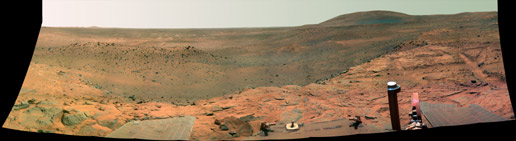
 The two Martian explorers, Spirit and Opportunity recently passed a major milestone - they've now been in operation collecting data and exploring the Martian surface for 4 years! The two Martian explorers, Spirit and Opportunity recently passed a major milestone - they've now been in operation collecting data and exploring the Martian surface for 4 years!Especially amazing is the fact that they were only expected to last 90 days. With Mars being essentially a graveyard for failed exploration missions, some would even say a curse, I just find it incredible that these things are still going. All has not been completely smooth though. A recent dust storm threatened to completely coat their solar panels and one of the rovers has a broken wheel, forcing it to have to move around backwards. Still, considering the continual problems with the Space Shuttle and the International Space Station, this program has exceeded all expectations and is an unqualified success. Personally I think everyone involved with this project should get the highest honour possible in the US. Here's to 4 more years!
|
| Mac To The Future |
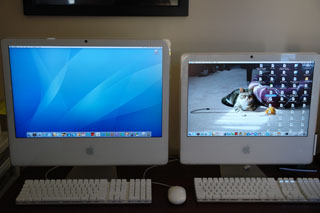
| So I went and bought another iMac. Why you ask? Well obviously cause it's BBF - Bigger, Better, Faster. While I was very happy with the iMac I already had, I decided to upgrade. I could have gone and bought one of the brand new aluminum models that just came out, but I had my heart set on a very specific model. The problem with the new ones is they come with a glossy screen and I've gotten quite used to the non-glossy display of my current Mac. In addition, there's been a number of um, problems with the new Macs - think of them as teething problems of a new design. So I scoured eBay until I found what I was looking for - a 24" iMac, 2.33Ghz duo core, 2GB memory, Nvidia video with 256MB of video memory, built in wireless, and a 750GB hard drive. The rare thing about this one is the expanded video memory as this was not a standard config but was instead a build to order option from Apple. The other unique thing about this model over other iMac versions is that it comes with a Firewire 800 port which is much faster than Firewire 400. And finally, as it's slightly newer, it has a longer warranty on it, good until 2010. Sitting it next to my 20" model really shows the difference. It's even more impressive in person with its 1920x1280 resolution screen. I connected the two systems together and ran the built-in Migration Assistant which copied over all the user accounts, applications, documents, and network settings. After about 6 hours (it also copied the 10,000 songs I have in iTunes) it was finished, I rebooted and everything that was on my old system was on the new system - talk about slick. I'm in Mac heaven right now :)
|
| Half Life 2: Episode 2 |
 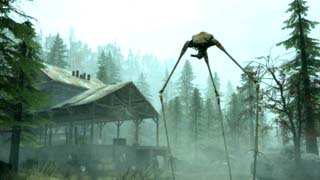 Halo? Please. Real gamers wouldn't be caught dead playing Halo - on a console no less. All the cool geeks are busy playing Episode 2. Halo? Please. Real gamers wouldn't be caught dead playing Halo - on a console no less. All the cool geeks are busy playing Episode 2.And I've just happened to have finished it. Hopefully I won't have to wait a year for Episode 3 to come out. So how was it? Well as you can see from the screenshot, a lot of the action takes place outside which is pretty cool. There's no new weapons, and really only one new enemy - the Hunters - which are basically smaller versions of Striders. Actually I found them to be much more annoying to deal with than Striders. The story progresses along, but there's no real breakthrough in understanding exactly what's going on, it merely exists to forward to the next episode, and as I've heard they're already working on the beginnings of Episode 4, apparently the next one won't neatly wrap things up either. So the main reason to play is because HL2 is still the best game ever made and it's fun as hell to play. Puzzle wise there was nothing to hard. There was only one point I got stuck at and it was only because I over looked something that should have been relatively obvious. The final battle scene is pretty intense though and I did more than a bit of swearing and banging on the desk until i was able to finish it. It looks like I might finally get to toss my behemoth tube monitor, as this time I was given the choices of standard resolutions, 16x9 (Hi-Def TV), or 16x10 (widescreen monitor). Finally! Hopefully all games coming out from now on will properly support these new resolutions. This was also the first time I've had a kickass system to play this level of game on, and I must say it was pretty sweet playing at 1680x1050 with all the settings maxed. With the new game engine, a lot of work was supposedly done supporting multi-core systems. So those running more than one CPU will definitely benefit. If you get the 'Orange Box', basically the special edition version, they throw in Half Life 2, Episode 1, Portal and Team Fortress 2 (TF2). Portal (which I haven't played yet) is a new puzzle/physics oriented game and TF2 is the next evolution of their classic multi-player game. Easily the best 50 bucks you could spend! |
| Blu-Ray Fun |
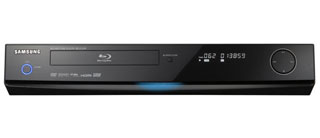 Which format is going to win out? HD-DVD or Blu-Ray? Well seeing as I just bought a Blu-Ray player, I'm hoping for the later. Which format is going to win out? HD-DVD or Blu-Ray? Well seeing as I just bought a Blu-Ray player, I'm hoping for the later.I was itching to spend money a couple weeks ago, so in a fit of impulse buying I bought Samsung's BPD-1200 player. Why Samsung? Well as much as I hate to admit it, even though Sony invented the technology, Samsung for whatever reason currently makes the best Blu-Ray players. I raced home, hooked everything up, popped in a disc (Underworld: Unrated) and was frustrated to find I couldn't get any sound. I mucked about with no luck, hooked the player up to the internet to check for a newer firmware version (I was running the latest) and was about to give up when I finally got it working. To quote Danny Glover in Lethal Weapon, "I'm getting to old for this shit!". Once everything was working I was taken in by the beauty that was Underworld in all it's 1080i glory. Chris couldn't really see any difference, but me being the videophile that I am, could definitely see it. That being said, I will admit that while my TV might be the reference for watching Hi-Def, you don't really appreciate the higher resolution on it's relatively small screen. I probably wouldn't recommend either Blu-Ray or HD-DVD unless your TV is over 50" and obviously it has to be a HD TV. The second disc I watched was Black Hawk Down. After watching it a couple of things became apparent. When buying a high def disc, check to see how it was encoded. Newer discs are encoded using either Mpeg-4 or VC-1. Older discs (such as Black Hawk Down) were mastered in Mpeg-2. While still better than standard DVD's, Mpeg-2 discs do not look as good as ones using the newer formats. The second thing was that I had a heck of a time getting it to initially play, I couldn't get past the main menu. Finally after several tries it played. As new discs come out, it is very likely you might run into issues playing them (Pirates of the Caribbean was notorious for this). Why? Because unlike standard DVD's the format and features for Blu-Ray are continuously evolving. You definitely want to keep your firmware up to date. A good review can be found here. |
| Can You Say Smokin? | |||||
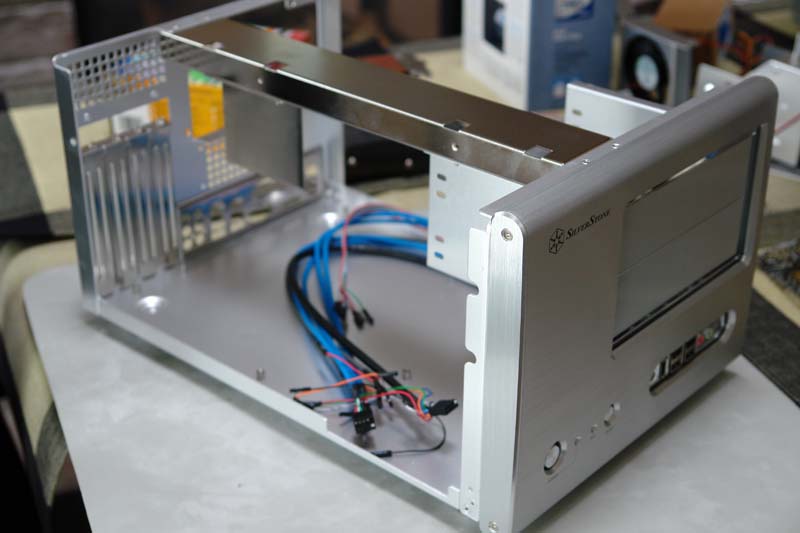
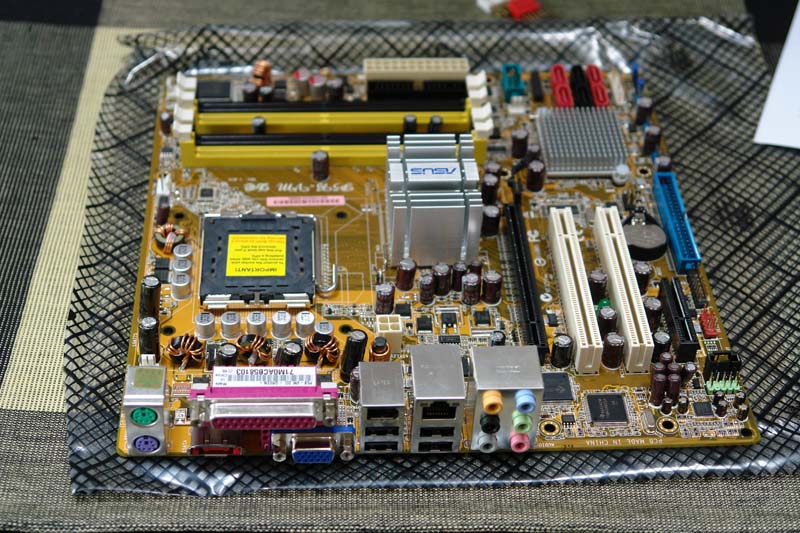
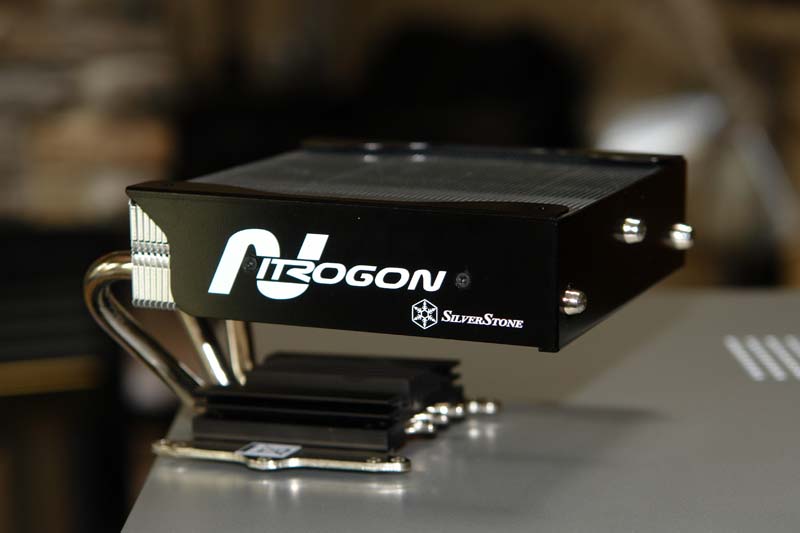
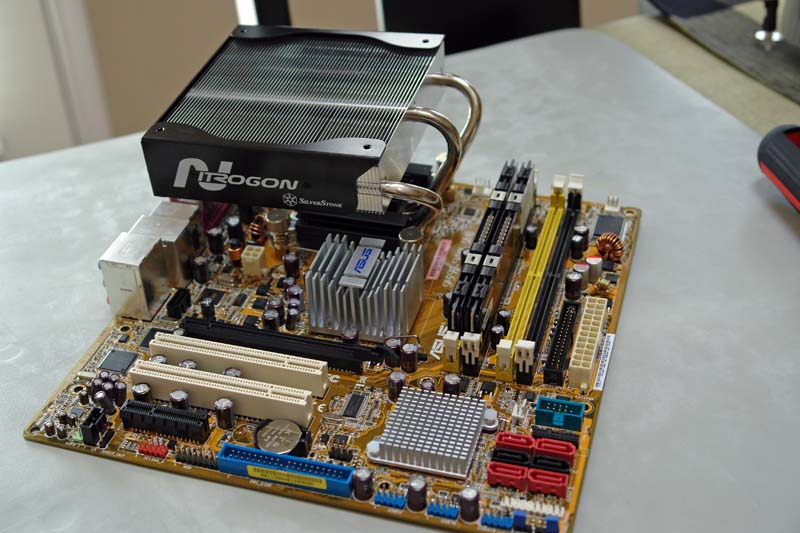
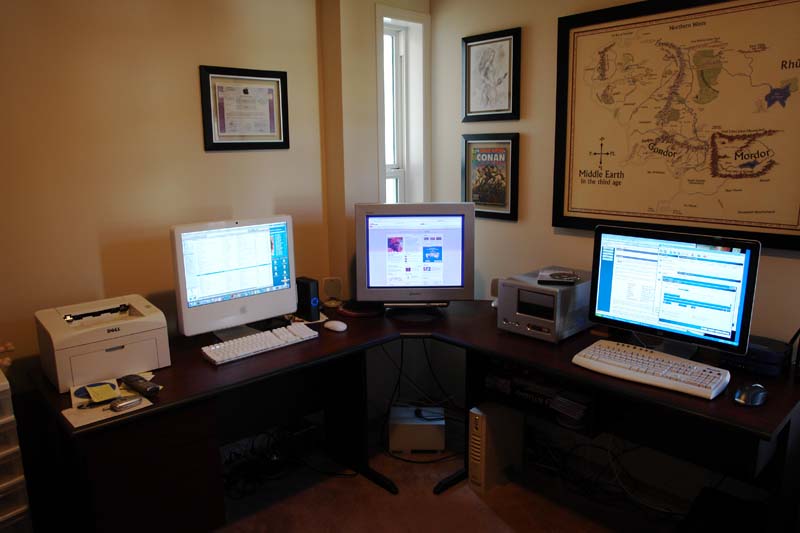
| Well I finally have my new system built. Not everything went according to plan, but overall I'm very happy with my new toy. So what issues did I have? Well for one I couldn't find the video card I wanted. For whatever reason Sapphire stopped making the water cooled version so I had to settle for a regular fan cooled version (and yes it's noisy when it ramps up). I've also held off buying the raid controller for now. That will have to wait for another day when I have more money to waste, er, I mean enhance my system. Finally I've decided to keep my 21" Trinitron monster as a second monitor. No, not so I can have the satisfaction of a multi-monitor system (that is pretty neat though) but mainly because there are so many stupid games that still don't support widescreen resolutions. So now that I've spent all that money and put in all that effort you'd think I'd be using my new rig all the time right? Wrong. Before I bought all the parts I made a conscious decision that I would only use it as a gaming machine. And Chris and I would start using the iMac I bought awhile ago as our main system for everyday use. I'll leave the write-up of using the Mac for another entry. So how does my gaming machine perform? Let's just say I ran a F.E.A.R benchmark and it averaged over 160fps without breaking a sweat. Ya, it's pretty sweet. I've already finished the F.E.A.R expansion pack as well as the BFME II expansion pack. Next up is Quake 4 and Star Wars KOTR: The Sith Lords. By the time I'm done them I'm hoping Half Life 2: Episode 2 will be out. I'll be in geek heaven! Here's some pix of my gaming rig's construction:
|
| My New Rig | |||||||||||||||||||||||||||
 So I just couldn't wait anymore. I've been holding off building a new system for about six months now and waiting for AMD to get it's act together was becoming unbearable. I've spent the past few days doing all kinds of research and have come up with my new system. So I just couldn't wait anymore. I've been holding off building a new system for about six months now and waiting for AMD to get it's act together was becoming unbearable. I've spent the past few days doing all kinds of research and have come up with my new system.The first thing I wanted was a smaller case. I'm tired of all the typical PC tower cases with their six drive panels on the front. Who the hell is going to put in six DVD/CD drives? The second thing I wanted was silence. I've seen some of the power systems out there with their 8+ fans. Are you kidding me? 8 fans? Am I going to be playing games or doing wind tunnel testing? The third thing I wanted was something that ran cool and didn't suck up a lot of power. Again, do I want a computer or a block heater? Finally, I wanted something affordable. There's no point in building the absolute fastest system (which would cost over $5000) simply to play games with, especially when there'll be something even faster a couple months later. Here then are the specs of my new rig:
What's cool about the motherboard is that I can upgrade the processor later on to Intel's quad core (4 processors) chip. It also comes with a PCIe x4 connector (most motherboards come with a PCIe x1 as the 2nd connector) which allows me to put the Adaptec controller in. Why not just use the motherboard raid? Because performance on integrated raid controllers is never as good as when you use a dedicated controller - plus mine comes with 128MB of cache. The video card is water cooled, which means that it's completely silent. And because it's water cooled Sapphire has overclocked it, making it the fastest X1950 XTX card available. I'm finally giving in and moving to an LCD monitor. Mostly because I'd like to start playing games in a widescreen aspect ratio and because my current 21" Trinitron generates soooo much heat and is too heavy for the glass desk I want to end up getting. I went with the HP over Samsung due to the inability to get the model with quality panels in it (see next post) and the HP allows me to swivel to portrait mode which is great for surfing the web. As to the choice of OS, I'm not going with Vista but will remain running XP. Gaming on Vista is a complete joke and it will be quite awhile before you start to see DX10 only games. Why Intel and not AMD? If I had my choice I would still go with AMD, but Asus doesn't have any other motherboards in a small form factor (SFF) that also has a PCIe x4 slot. Performance wise Intel is better, but AMD chips are typically more energy efficient. So it's a bit of a wash for me - in the end motherboard options are what made me pick Intel. So far I've ordered the motherboard and CPU off of eBay (and saved over $100 doing so) and I'll be ordering the rest over the next week or so. Final cost? It should be under $2000. Once I get everything together I'll post pictures of the assembly process as well as benchmark results. |
| LCD Russian Roulette |
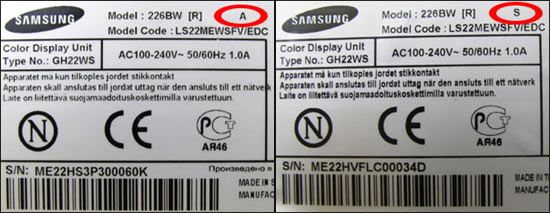
 In looking at what monitor I wanted to replace my trusty Sony Trinitron behemoth with I came across a disturbing trend. In looking at what monitor I wanted to replace my trusty Sony Trinitron behemoth with I came across a disturbing trend.It would appear that monitor manufacturers will submit their best made panels to all the reviewers. Then after getting stellar reviews they will switch production to use 3rd party panels (usually made in China) thereby lowering their costs and increasing their profits. The problem? As a consumer you don't know if you're getting the amazing monitor that you read about or if you're getting one of the cheaper quality versions. Case in point is the Samsung 226bw. There are no less than four different versions containing panels made by different companies all of varying quality - and they're all sold as being the same model number! See this link for details. Sure enough, I went down to the local FutureShop and they are selling the 'A' version. The moral of the story is that when it comes to monitors you may or may not be getting the product you thought you were buying.
|
| AMD's Downward Spiral |
 Wow, this has not been a good year to be an AMD fanboy. Wow, this has not been a good year to be an AMD fanboy.Ever since Intel released their Core Duo chips they've been taking a pounding. Salvation was supposed to appear this summer with the release of their new Barcelona chips and their move to a 65nm manufacturing process. Now dark rumours have been circulating that their new consumer chips which were pushed back to the fall now won't be available until Q1 2008! In addition to that, no one that I know has stock of any Athlons manufactured with the new process, they simply don't exist in any noticeable volume yet. Then there's their acquisition of Canadian company ATI, which only just released their first DirectX 10 video cards to tepid reviews. All while enduring a record losing quarter with massive layoffs on the horizon. On the plus side because Intel's chips vastly outperform theirs, they've been responding with a price war. Their fastest mainstream chip is priced less than half of Intel's offering. So as a consumer, you can get an amazing processor for dirt cheap. Because of this I'm thinking I might bite the bullet this summer and build a new system, likely running an Athlon 5000 which can be had for even cheaper off of eBay - as much as I'd like to, I can't wait another 6 months until these new offerings become available. Sadly with the way things are going, AMD might not even be around in six months... |
| Facebook Musings |
 Ok, so I admit I finally got suckered into creating an account on Facebook. Ok, so I admit I finally got suckered into creating an account on Facebook.For those not in the know, Facebook is a 'social networking' website. Essentially it allows you to easily keep up to date with what's happening with your online circle of friends. Some of the site features I find to be complete wastes of time: 'Poking' people, buying people gifts (just images that get displayed on your profile) etc. But I'll admit some of it is useful - registering what High School you went to for example. Just today I got an email from someone I went to school with. So yes, in that respect it's pretty neat. It's not like you couldn't Google someone to try and find them, but this just makes it much easier. However I usually feel like an idiot when I'm on there. I have to keep asking Chris, 'how do you do that?', 'what's this for?' and so on. To me it's not very intuitive. I guess my biggest issue is that to be honest, I feel somewhat threatened by it. For years I was the only one in my group of friends who had my own website. I spent a lot of time designing this site from scratch. I had to learn how to use FrontPage and to a lesser extent HTML, and it takes me considerable time to do major updates such as the Honeymoon pictures. But now anyone can do exactly the same thing without any knowledge of computers and without any real effort involved. Want to read someone's movie reviews? Easy! Want to know how they're feeling? No problem! Want to see their latest posted photos? It's a breeze! Want to watch them on their webcam? Well, ok you can't do that yet (I think) but I'm sure it won't be long before you can. So ya, I'm pretty much feeling like a dinosaur right now. I think I need a 'Poke'... |
| Coffee Heaven |
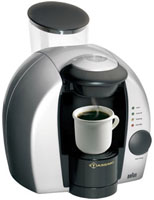  I was out shopping this past weekend, just itching to spend money, when I came across this wonderful little product. The Braun Tassimo. Essentially it's one of those fancy coffee makers. It can make Latte's, Cappuccino, regular coffee, Hot Chocolate, and even Tea. I was out shopping this past weekend, just itching to spend money, when I came across this wonderful little product. The Braun Tassimo. Essentially it's one of those fancy coffee makers. It can make Latte's, Cappuccino, regular coffee, Hot Chocolate, and even Tea. I've thought about getting something like this in the past, but they always looked really complicated. With this one however, it's stupid simple. You pour water into the reservoir at the back, pop in one of the coffee 'discs', and press the big start button. Each disc has a barcode on it which the machine reads and adjusts itself accordingly. How does it taste? Well to be honest I prefer my Starbucks coffee grinds in my old maker for regular coffee. But it does make terrific Latte's and Hot Chocolate. And let's face it, it's pretty neat. The downside? Well you do seem to go through the coffee discs disturbingly fast. And while you might technically be able to recycle them, in reality most people will just end up tossing them in the garbage. |
| System Quandry |
| I've bought several games recently - the newest expansion for Battle for Middle Earth II, the add-on for F.E.A.R., Quake 4, and Star Wars Knights of the Old Republic II. Yet I'm not playing them. Why? Because I want to experience them on a faster computer and potentially on a wide screen monitor. It's becoming more and more apparent that my current PC needs to be replaced and I don't want it to prevent me from experiencing these games in all their maxed out glory. So it would be simple to just go out and get a new system right? Unfortunately I'm making a conscious decision to wait until the summer. Part of it is financial, but the main reason is the timing just isn't right. AMD should be releasing their quad-core CPU's shortly, in addition to new dual-cores that use much less power. As well, the specs for PCI Express v2 have just been finalized. Motherboards will soon be coming out that integrate it and it's much faster bandwidth. Finally ATI will be coming out with their answer to Nvidia's 8800 graphics card. Essentially there will be a convergence of new CPU, motherboard, and video card designs over the next few months. Until then, I'll have to make do with playing the NeverWinter Nights conversion of the gaming classic Eye of the Beholder. |
| Mac OS X v10.4.9 Released |
| Apple just released their latest update to Tiger, bringing it to 10.4.9. This will likely be the last update for it, with the next version OS, Leopard, due to be released in a couple months. To quote Apple's website, these are the major changes: Specific changes in the 10.4.9 release include improvements to raw camera file support; handling of large or malformed images that could cause crashes; image capture performance; mouse scrolling and keyboard shortcuts; font handling; playback quality and bookmarks in DVD player; USB video conferencing cameras for use with iChat; Bluetooth devices; browsing AFP servers; Apple USB modem; Windows-created digital certificates; Open and Print dialogs in Rosetta-based applications on Intel-based Macs; time zone and Daylight Savings Time changes for 2006 and 2007, and security updates. All I know is that I've applied it both on my Intel based iMac and my PPC based eMac without any issues. |
| PVR Musings |
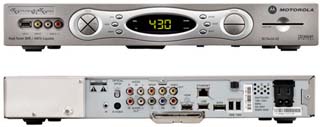 So we finally went out and bought a Personal Video Recorder (PVR) from Shaw. I managed to take my old Hi-Def box back to them for a credit - a whopping $250. So in the end I still paid over $500 for this thing. So we finally went out and bought a Personal Video Recorder (PVR) from Shaw. I managed to take my old Hi-Def box back to them for a credit - a whopping $250. So in the end I still paid over $500 for this thing.Overall I'm extremely happy with it. I must admit I didn't really 'get' it until I started using one. Now I couldn't imagine not having one. The main benefit of a PVR is the ability to record shows (up to two shows at the same time), pause live TV, and skip through commercials. Two added bonus features for me are the inclusion of a HDMI port (my previous box only had DVI) and for whatever reason Hi-Def content looks even better now. The hard drive in this model is 160GB and the literature states it can hold many hours of recorded shows. I know we've recorded many shows on it already and we've only used a quarter of it's capacity. I'm off to go watch the entire season of Surreal Life Season 1 in one sitting :) |
| Site Redesign |
| As you can see I've redesigned the Tech Corner. Why you ask? Obviously technology has played a large part both in my career and in my hobbies. Originally I envisioned this as an area where I could share with everyone else my love of computers, gadgets, and all things electronic. I then went on to categorize things by games, news, hints and utilities. Unfortunately as time went by I found this area getting updated less and less. Updating just the Tech Corner could be a full time job and I simply don't have the time. Plus with so many excellent websites already out there covering the industry why reinvent the wheel? So I've now decided to simplify things - one main page and an archival page. Rather than writing about every little announcement or development that occurs on a daily basis I instead intend on focusing on areas that I have a direct interest in or experience with. In the future I also intend on adding a page detailed my computer collection as well as one detailing my arcade and video games. And apologies to Slashdot for my shameless theft of their icon library :) |